Nano Banana 10分鐘新手速成指南
如果您是 nanobanana2 新手,最常見的錯誤是將提示寫成充滿氛圍的詩。更快的方法是了解何時使用哪個功能並編寫規範等提示。按照這個 10 分鐘檢查表執行一次,您將在大多數工作流程中獲得穩定的結果。
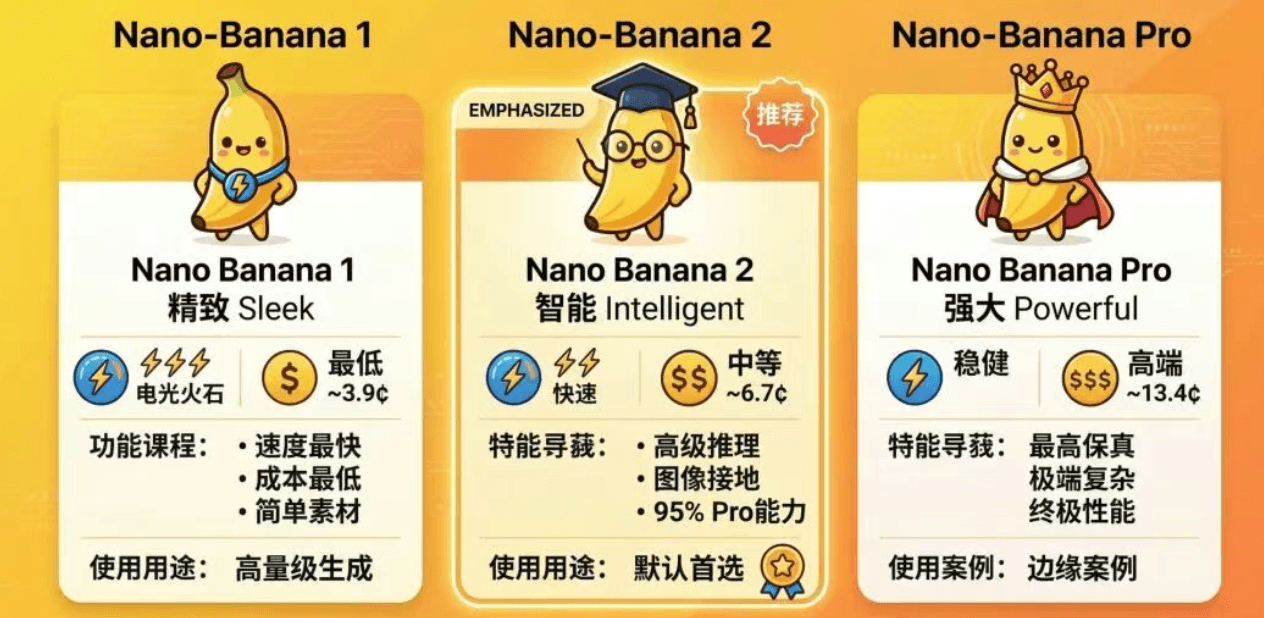
1) 選出正確的型號:1 vs 2 vs Pro
使用一個簡單的決策規則:
- Nano Banana 1:最便宜/最快的草稿,簡單的場景
- nanobanana2 (Nano Banana 2):大多數工作的預設值;嚴格的指示遵循+一致性
- Nano Banana Pro:僅當複雜約束或精確編輯持續失敗時才升級
2) 特徵:接地(當精度很重要時)
當您需要真實世界的準確性(地點、地標、物種)時,接地會有所幫助。將其用於:
- 特定地點(教堂、橋樑、利基建築)
- 特定物種(蝴蝶、昆蟲、植物)
可複製的提示(位置):
Generate a cinematic golden-hour photo of [LOCATION].
Requirements: match real architectural details and surroundings; 35mm; shallow DOF; natural light.
Output: 16:9, HD.
3) 512px「廉價探索→高檔」工作流程
而不是儘早在 2K/4K 上花費成本:
1)產生許多 512px 變體來尋找構圖 2) 選擇最好的和升級到1K/2K/4K了解詳細信息
這會產生更快的迭代和更高的最終品質。
4) 橫幅、提要、漫畫的極端寬高比
可複製的提示(4 格漫畫,4:1):
Create a 4-panel horizontal comic (aspect ratio 4:1).
Story: a cat tries to steal a fish, with a twist ending.
Style: bright Franco-Belgian comic; keep the cat design consistent; text readable.

```可複製提示(8:1 橫幅擴充):
Extend the current image to 8:1. Constraints: do not distort or crop key subject; extend background naturally; keep style consistent; keep text readable.
## 5) 思考模式:預設關閉

僅在需要時啟用它:

- 複雜的資訊圖表/嚴格的排版
- 一次多個約束(佈局+副本+數字)
- 接地加空間推理

## 6) 10 分鐘練習提示(高訊號)

執行此命令來測試佈局+文字穩定性:
Create a product selling-point infographic poster. Product: wireless noise-canceling headphones. Selling points: 40-hour battery / ANC / low-latency gaming mode. Layout: title area on top, hero product in the center, 3 feature cards below; generous whitespace; clean alignment. Style: modern tech, dark background, rim light, premium materials. Text must be accurate: title “Wireless Noise-Canceling Headphones”, and the three points above. Output: 4:5, HD.
<div class="not-prose my-10">
  <a href="https://app.nanobanana-pro.vip/generate/image-tools/nano" class="inline-flex items-center justify-center rounded-xl px-8 py-4 text-base font-bold text-white shadow-lg transition hover:opacity-95" style="background: linear-gradient(135deg, #f59e0b 0%, #ea580c 50%, #c026d3 100%);">
    立即使用NanoBanana
  </a>
</div>