Nano Banana Quick Start: Productive in 10 Minutes
If you’re new to nanobanana2, the most common mistake is writing prompts as vibe‑heavy poetry. A faster approach is to learn when to use which feature and to write prompts like specs. Follow this 10‑minute checklist once and you’ll get stable results in most workflows.
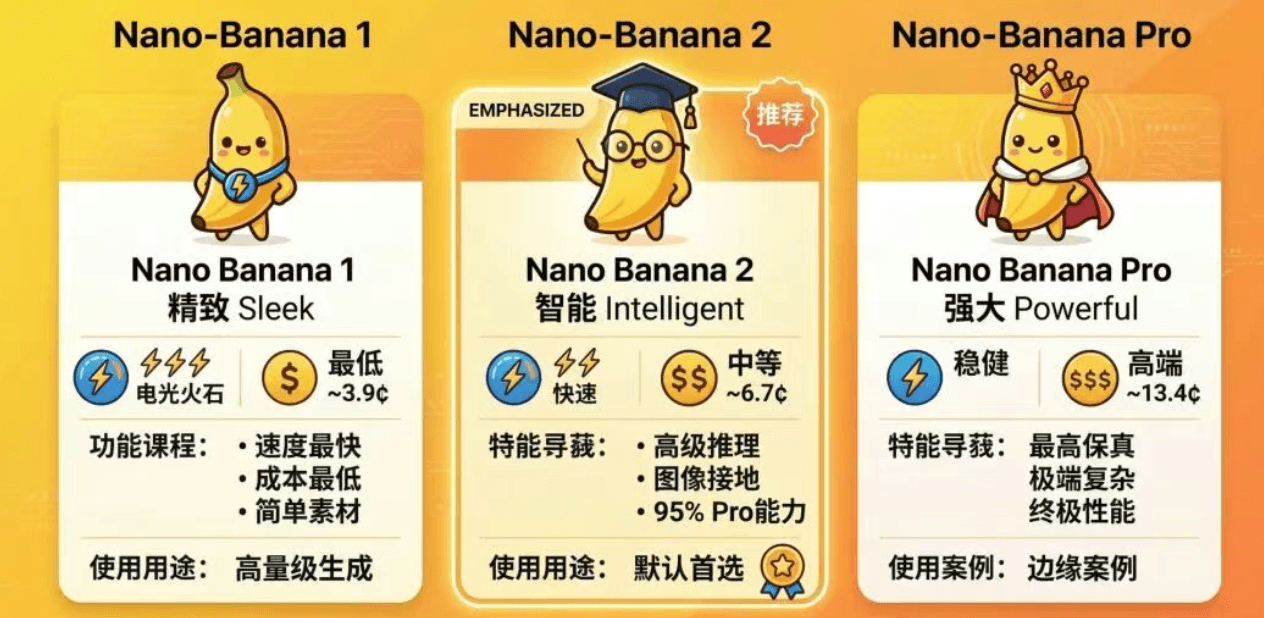
1) Choose the right model: 1 vs 2 vs Pro
Use a simple decision rule:
- Nano Banana 1: cheapest/fastest drafts, simple scenes
- nanobanana2 (Nano Banana 2): default for most work; strong instruction following + consistency
- Nano Banana Pro: upgrade only when complex constraints or precision edits keep failing
2) Feature: Grounding (when accuracy matters)
Grounding helps when you need real‑world accuracy (places, landmarks, species). Use it for:
- specific locations (churches, bridges, niche architecture)
- specific species (butterflies, insects, plants)
Copyable prompt (location):
Generate a cinematic golden-hour photo of [LOCATION].
Requirements: match real architectural details and surroundings; 35mm; shallow DOF; natural light.
Output: 16:9, HD.
3) The 512px “cheap exploration → upscale” workflow
Instead of spending cost on 2K/4K early:
- generate many 512px variants to find composition
- pick the best and upscale to 1K/2K/4K for details
This produces faster iteration and higher final quality.
4) Extreme aspect ratios for banners, feeds, comics
Copyable prompt (4‑panel comic, 4:1):
Create a 4-panel horizontal comic (aspect ratio 4:1).
Story: a cat tries to steal a fish, with a twist ending.
Style: bright Franco-Belgian comic; keep the cat design consistent; text readable.
Copyable prompt (8:1 banner extension):
Extend the current image to 8:1.
Constraints: do not distort or crop key subject; extend background naturally; keep style consistent; keep text readable.
5) Thinking mode: keep it off by default
Enable it only when you need:
- complex infographics / strict typography
- multiple constraints at once (layout + copy + numbers)
- grounding plus spatial reasoning
6) A 10-minute practice prompt (high signal)
Run this to test layout + text stability:
Create a product selling-point infographic poster.
Product: wireless noise-canceling headphones.
Selling points: 40-hour battery / ANC / low-latency gaming mode.
Layout: title area on top, hero product in the center, 3 feature cards below; generous whitespace; clean alignment.
Style: modern tech, dark background, rim light, premium materials.
Text must be accurate: title “Wireless Noise-Canceling Headphones”, and the three points above.
Output: 4:5, HD.
Once this is stable, you can reuse the same skeleton for most e‑commerce or marketing visuals.